
Most HR letters still take the long way round. Someone opens last year's offer letter in Word, changes the name, salary and dates by hand, exports a PDF, emails it, and then waits for a printed, signed and scanned copy to come back. Somewhere in the middle, an old designation or the wrong joining date slips through.
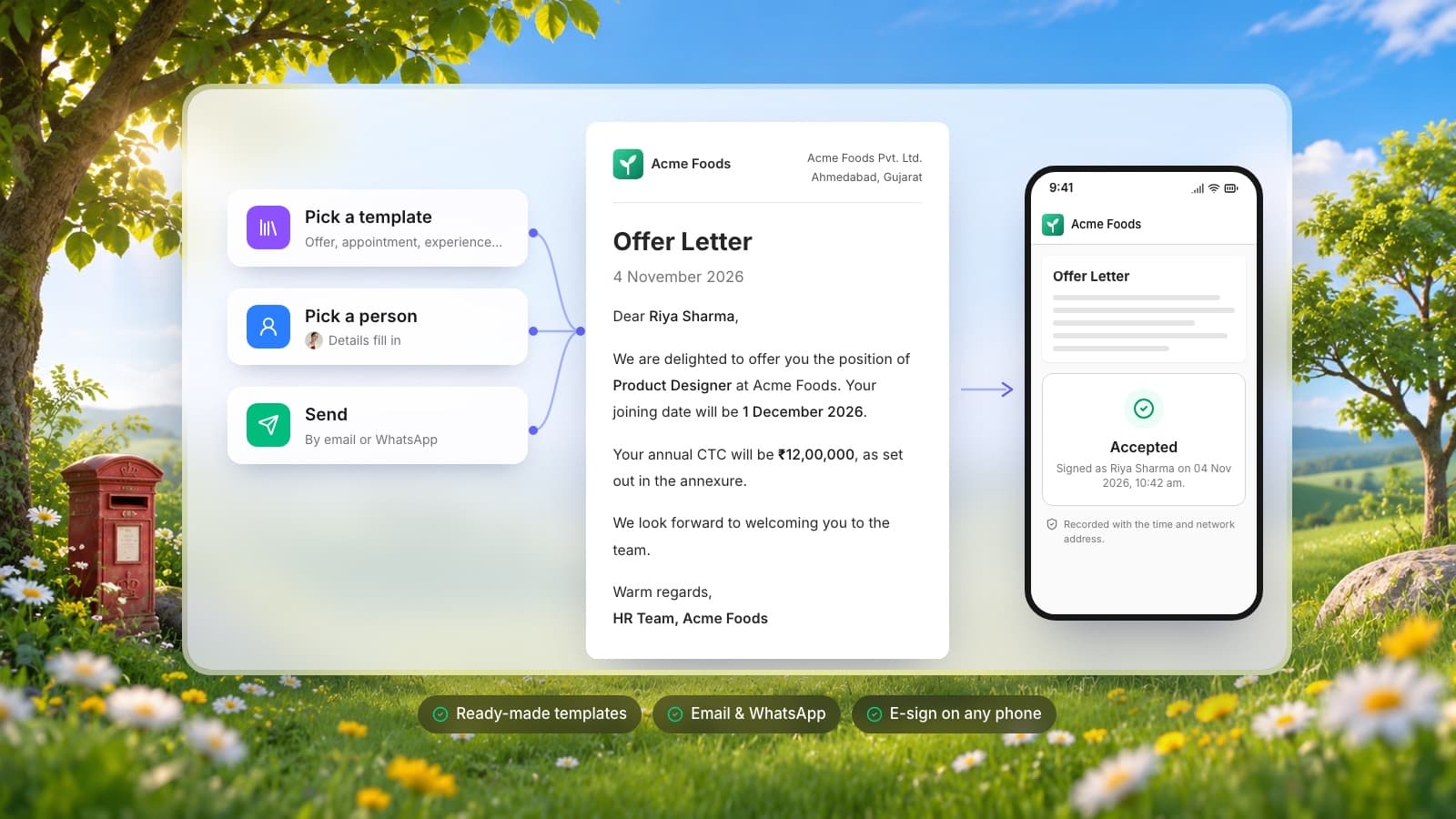
Letters is our answer to that. It's now live in Piplhr: pick a ready-made letter, choose the person, and their details fill in. Send it by email or WhatsApp, and they read and sign it on their phone. Every letter and every response stays on record.
Where to find it
In Piplhr, open Training → Documents → Letters. Everything below happens from there.
Start from a ready-made letter
You don't start from a blank page. The Piplhr template library gives every company five letters it will need sooner or later:
- Experience Letter: confirms the person's role and tenure after they leave.
- Relieving Letter: confirms the resignation was accepted and the person is relieved.
- Salary Increment Letter: annual or mid-year revision of pay.
- Promotion Letter: moves the person to a new role, with their revised pay and manager.
- Warning Letter: a formal written warning about conduct or performance, with an acknowledgement section.
On top of that, you get an Offer Letter and an Appointment Letter written in your industry's terms, plus two more letters your industry typically needs. There are packs for technology, manufacturing, healthcare, retail, education, hospitality, finance, construction, logistics and professional services, and Piplhr picks yours from your company's industry.
Every template is yours to edit. Change the wording, add your own fields, or write a new letter from scratch.
Add your letterhead once
Letters go out on your letterhead, not a plain page. Design one in Piplhr (style and accent colour) or upload the one you already use, either as a header image or as a full-page background. Until you set one up, letters use your company name, address and logo. Save it once and every new letter uses it.
Pick a person and the details fill in
Choose who the letter is for: an employee or a candidate. Search by name, pick them, and Piplhr fills in what it already knows, such as their name, designation, joining date and pay. You see the letter update live as each field lands.
Anything Piplhr doesn't know yet shows as a blue placeholder like [Annual CTC], so nothing goes out half-filled by accident. Fill it in, check the preview, and save it as a draft or send it straight away.
Send it by email or WhatsApp
When you send, the person gets a secure link to read, download and respond to their letter. You can:
- Email the letter: the PDF goes with it, along with an optional personal message.
- Share the link on WhatsApp: if their number is on file, WhatsApp opens straight in their chat with the link ready to send.
- Copy the link: paste it anywhere else.
Once sent, the letter is locked. What they read is exactly what you sent, and it can't be changed by either side afterwards. If you need to pull it back, you can withdraw it.
They read and sign on their phone
The link opens on any phone or laptop. They don't need a Piplhr account or an app.
- To accept, they type their full name (it must match the name on the letter) and confirm they've read and accept its terms.
- To reject, they can add an optional reason, so you know why and can follow up.
- A respond-by date keeps things moving. After it passes, the letter can no longer be answered.
- Letters that need no response, like an experience letter, are simply there for their records.
Each response is recorded with the time and their network address, and you're notified the moment they reply.
Every letter stays on record
Sent letters don't disappear into someone's outbox:
- Employee letters show under Letters on their profile.
- Candidate letters go into their candidate files and their hiring timeline.
- Insights show how your letters are doing: who has opened and responded, who is still pending, and which letters expire within the next two days, so you can send reminders in one go.
Get started in five steps
- Open Training → Documents → Letters in Piplhr.
- Set up your letterhead once.
- Pick a letter from the template library and adjust the wording if you need to.
- Choose the employee or candidate and check the details that fill in.
- Send it by email or WhatsApp, and watch for their response.
If you're building a hiring and onboarding process around this, our employee onboarding checklist covers what should happen between the signed offer letter and the person's first productive week.