
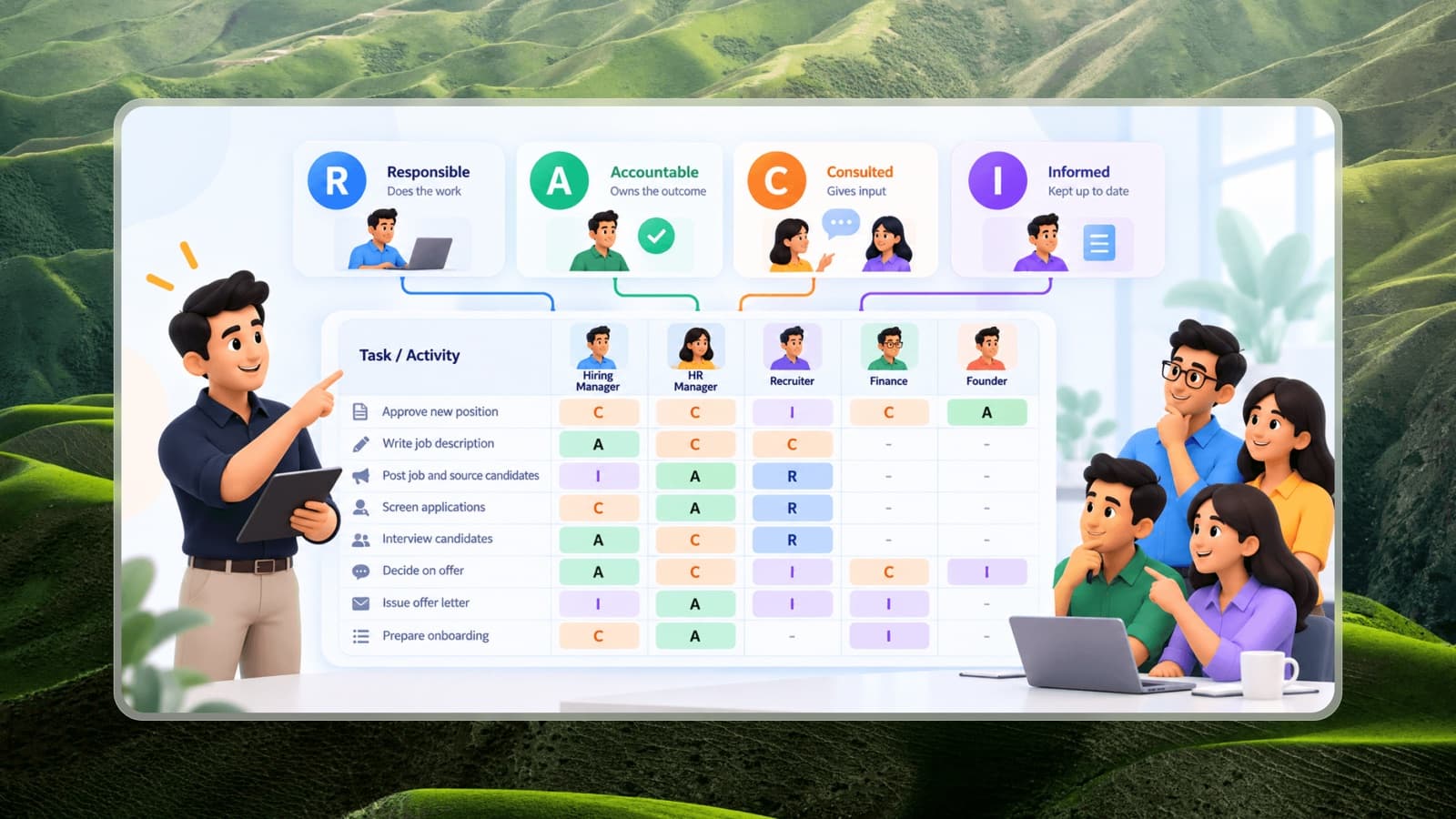
A RACI matrix is a simple table that shows who does what in a process or project. For each task, it assigns people or roles one of four letters:
- R - Responsible: does the work.
- A - Accountable: owns the outcome and signs off. The buck stops here.
- C - Consulted: gives input before or during the work (two-way communication).
- I - Informed: kept up to date on progress or decisions (one-way communication).
It's one of the fastest ways to expose the two most common teamwork problems: tasks nobody owns and tasks too many people think they own.
The rules that make RACI work
A RACI chart is only useful if it follows a few rules:
- Exactly one A per task. Two accountable people means nobody is really accountable.
- At least one R per task. Somebody has to do the work. The A and R can be the same person for small tasks.
- Keep Cs to a minimum. Every C adds a conversation and slows things down. Consult people whose input genuinely changes the outcome.
- Don't inform everyone. Too many Is creates noise. Inform people who need to act on the result.
- Use roles, not names, so the chart survives people changing jobs.
Example 1: Hiring a new employee
Reading across the rows, it's immediately clear that HR owns the process of hiring, while the hiring manager owns the decision about who is hired.
Example 2: Launching a new product feature
How to build a RACI matrix
Step 1: List the tasks or decisions
Use the key steps of a process or the main pieces of work in a project. Aim for 8-20 rows; more than that usually means the chart is too detailed to be useful.
Step 2: List the roles
Put roles across the top, including external parties like vendors or clients if they play a part.
Step 3: Assign the A first
For each row, decide who owns the outcome. This is where most of the valuable discussion happens.
Step 4: Assign R, then C and I
Add who does the work, who genuinely needs to give input, and who needs to know the result.
Step 5: Check the columns
Read down each role's column:
- Lots of Rs: is this person overloaded?
- Lots of As: is everything waiting on this role?
- No empty cells: is this person involved in everything? That's rarely necessary.
- Only Is: does this role need to be on the chart at all?
Step 6: Review with the team and publish
Walk through the chart with everyone involved. Then store it with the related SOPs and role descriptions so it's used, not filed.
Common RACI mistakes
- Multiple As - often done to avoid upsetting people. It defeats the purpose.
- Confusing A with seniority. The accountable person should be the one closest to the outcome who has the authority to decide, not automatically the most senior person.
- Consulting everyone. Feels inclusive, but makes every decision slow.
- Building it once and forgetting it. Update the RACI when the process or team changes.
- Replacing role definitions with RACI. RACI clarifies ownership in a specific process; it doesn't replace clear roles and responsibilities for each position.
RACI alternatives
- RASCI / RACI-S: adds S - Supportive, for people who help the Responsible person without owning the work.
- DACI: Driver, Approver, Contributors, Informed - popular for decision-making rather than execution.
- RAPID: Recommend, Agree, Perform, Input, Decide - used for big decisions that involve many people.
For most small and mid-sized teams, plain RACI is enough. Start with your most painful cross-team process, build the chart in a meeting, and see how many "I thought you were doing that" conversations disappear.