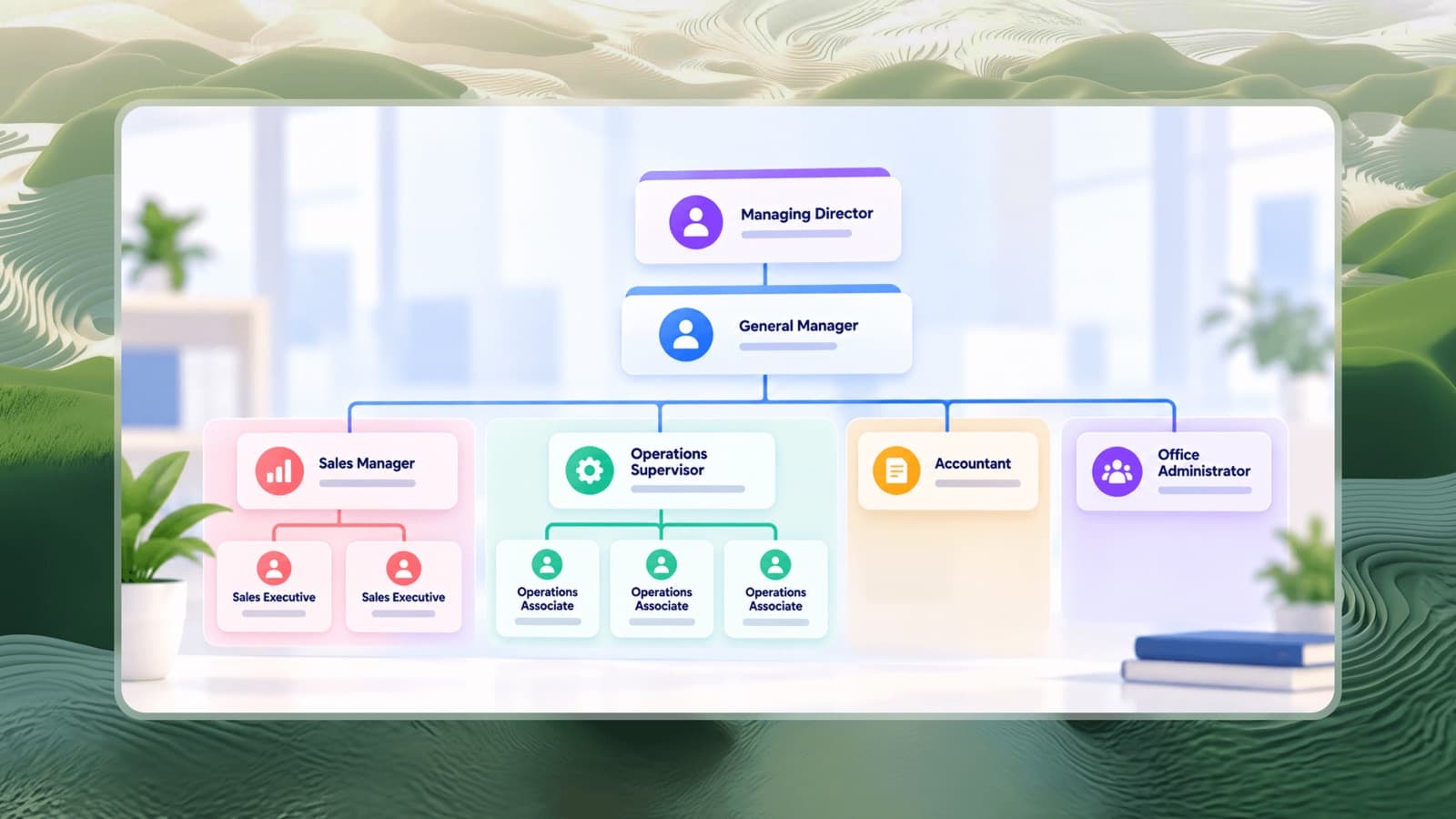


An org chart (short for organizational chart) is a diagram that shows how a company is structured: the people or positions in it, how they are grouped, and the reporting relationships between them. At a glance, it answers three questions every employee eventually asks - where do I fit, who does what, and who do I go to?
What an org chart shows
A typical org chart includes:
- Positions or people - usually shown as boxes with a name and job title.
- Reporting lines - lines connecting each person to their manager.
- Groups - departments, teams, locations or business units.
- Levels - how many layers sit between the top of the company and front-line roles.
Some charts also show open positions, headcount per team, contact details or dotted lines for secondary reporting relationships.
Why org charts matter
Org charts are often treated as an HR formality, but they solve very practical problems:
Clarity for employees
New hires learn who's who much faster. Existing employees know who owns a decision and who to escalate to.
Better decisions for leaders
Seeing the whole structure reveals problems that are invisible in a spreadsheet: a manager with fourteen direct reports, a department with no clear head, or a founder who is still the manager of almost everyone.
Planning growth
Adding open roles to the chart turns it into a hiring plan, showing exactly where new people will sit and who will manage them.
Communication with outsiders
Investors, auditors, partners and clients often ask for an org chart to understand who is responsible for what.
The main types of org charts
Org charts reflect the type of organizational structure a company uses. The most common are:
1. Hierarchical (top-down) org chart
The classic pyramid: one leader at the top, managers below, and staff below them. Each person has one manager. Most small and mid-sized companies use this format.
2. Functional org chart
A hierarchical chart grouped by function - sales, operations, finance, HR - with a head for each department. It's the natural next step once a company has distinct specialist teams.
3. Divisional org chart
The company is split into divisions by product, region or customer segment, each with its own functions. Common for businesses with multiple brands, outlets or locations.
4. Matrix org chart
People report to two managers - often a functional manager and a project or product manager. Drawn with solid lines for the primary manager and dotted lines for the secondary one.
5. Flat org chart
Very few management layers; most people report directly to a small leadership group. Common in early startups. See flat vs hierarchical structures for the trade-offs.
Org chart example
Here's a simple structure for a 20-person service business:
- Managing Director
- General Manager
- Sales Manager → 2 Sales Executives
- Operations Supervisor → 3 Operations Associates
- Accountant
- Office Administrator
- General Manager
Even at this size, the chart makes something obvious: the managing director has one direct report, so the general manager is the real day-to-day decision maker. That's a structure choice the whole team should understand.
You can explore complete examples for different industries in our org chart templates - including startups, restaurants and hospitals.
What to include on your org chart
At minimum, every box should show:
- Name (or "Open position")
- Job title
- One reporting line to their direct manager
Optional details that add value:
- Team or department colour coding
- Headcount per team
- Location for multi-site businesses
- Links to each role's responsibilities
Avoid cluttering the chart with phone numbers, salaries or long descriptions - keep those in your HR system or handbook.
Common org chart mistakes
- Letting it go stale. An out-of-date chart is worse than none. Update it whenever someone joins, leaves or changes roles.
- Showing people, not roles. When a person holds two roles, show both so it's clear the second role exists and may need a hire.
- Hiding the real structure. If everyone actually goes to the founder for decisions, a chart that shows otherwise creates confusion rather than clarity.
- Too many dotted lines. One or two secondary relationships are fine. If most boxes have dotted lines, the structure itself needs work.
How to create an org chart
You can draw an org chart in presentation software, but it becomes painful to update. A dedicated tool lets you add, move and remove boxes without redrawing lines. Our free org chart maker lets you start from a template, edit in the browser and download as PNG or PDF - or follow our step-by-step guide on how to make an org chart.